A bug is any error, mistake, or fault in software that prevents it from functioning as intended. Bugs occur in different programming languages and at different stages. We shall be looking at the Bug Life Cycle in Software Testing in this write-up.
Bug Life cycle refers to the various levels or stages of dealing with a bug from the time it was discovered till the time it was completely debugged, fixed and tested. This is also referred to as the Defect Life cycle or Issue life cycle.
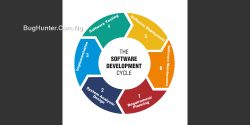
The bug life cycle is an approach useful for software development and testing. It aids in tracking bugs throughout the program development period. It is also effective during maintenance. You may also want to know What is Software Development Life Cycle.
The main purpose of the bug life cycle is to easily identify and communicate the current state of a bug when any change is being made. This process makes debugging very fast, efficient, and systematic. Understanding and following the right stages of debugging ensures that software behaves as expected and has all the needed features. In this article, I will be showing you the different stages in the Bug Life Cycle in Software Testing.
Bug Life Cycle in Software Testing – Stages
A typical bug/defect life cycle consists of these important stages:
1. New
This is the first stage of a bug. At this stage, it is just noticed and reported by a software tester (Reporter) or an endpoint user. The bug is labeled as New, undergoes a check to confirm its existence and relevance then is logged into a bug-tracking system like Jira Software.
2. Assigned
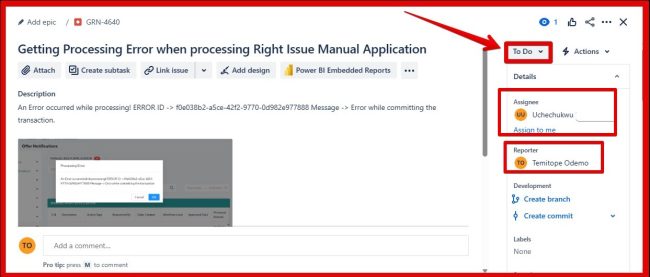
After a bug is confirmed to exist, it is assigned to a development team for further investigation and debugging. At this stage, the bug is labeled Assigned to (Assignee). This means that a developer has been assigned to resolve the bug and the status is changed to T0-DO.
3. Open
At this stage, the developer has recreated the same bug for confirmation and started implementing and trying out possible solutions. The bug is labeled Open to show that work has started on fixing the bug.
4. In-Progress
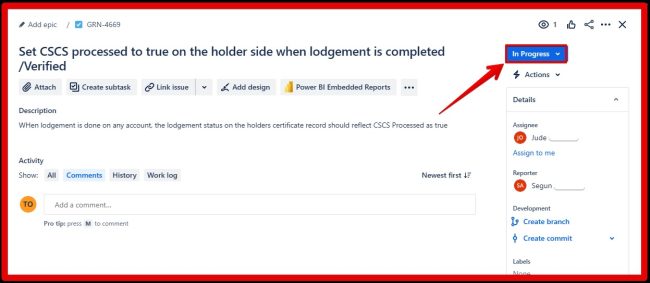
A bug is labeled In Progress when a developer is currently and actively working on it. The developer finishes the debugging and resolving at this stage of the bug.
5. Fixed
Once the development team has solved the issue, the bug is now labeled Fixed. However, this does not mean that the bug has been completely resolved, and the software is ready to be released. It only confirms that the developer had settled that particular problem and ready for test.
6. Ready for Test
After a bug is fixed, it passes through internal testing to verify the success of the resolution and if the fix did not introduce or lead to a new defect. At this stage, the bug is labeled Ready for Test. At this stage, a software tester retests the software or feature to examine whether the fix by the developer solves the issue and if the bug fix status can be updated to Closed.
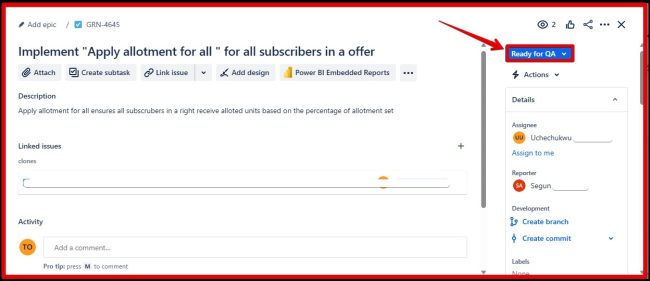
7. Re-tested
When a bug passes the final retest, meaning that the bug has been fixed correctly and no new bugs are being detected, It is labeled Retested or Verified. Finally, the quality assurance team will close the bug because it is considered and has been confirmed to be resolved.
8. Closed
At last, the bug is marked as Closed to prove that it has been reported, fixed, retested, verified, and officially closed. However, the bug remains in the system for reference purposes, but it is no longer considered an active issue.
9. Re-Open
If the same bug is not completely fixed, it can be reopened, and the cycle will be repeated all over again.
Some advantages that come with following the Bug Life Cycle in Software Testing
- Priority management: The Bug life cycle makes it easier to determine the priority level of each issue. This helps to decide which bugs will be addressed before the others.
- Clarity and Organization: Every detected bug is assigned a specific progress status which makes it easier to identify its current state and the steps needed to resolve it.
- Accountability: Sticking to the bug life cycle improves accountability. Assigned developers focus on resolving the bugs while testers follow the progress accordingly.
- Predictability: Following the bug life cycle makes room for easy predictability in project releases and development stages. The developers and testers can calculate, estimate and work within the time required for the bug resolution.
- User Satisfaction: No doubt, the reason for detecting and resolving bugs is to meet the needs of the software users. When the life cycle is followed, the development team delivers more effective software.
Following the bug life cycle is an excellent approach to resolving software defects throughout the entire existence period. Implementing a well-defined bug life cycle contributes to the improving quality and development efficiency of the software. You can also learn How to Write a Good Bug Report (A Complete Guide).
I hope you found this blog post on Bug Life Cycle in Software Testing Interesting and helpful. In case you have any questions do not hesitate to ask in the comment section.